Features
How Kadrella runs your lessons, start to finish
Superprof, WhatsApp, scheduling, invoicing, reminders and the bank: one week, told in full.
Superprof
A request comes in, Kadrella replies before you do
A student sends a request through Superprof. Kadrella picks it up, creates their file and replies automatically while you are still teaching.
New lesson request
Maths · Year 13 · Wednesday 5pm · Léa M.
Superprof
A lesson request imports the student and pre-fills the lesson, ready to confirm. It also: pulls Superprof payments automatically into the same ledger as bank transfers and WhatsApp, collects received reviews without asking, and can nudge Superprof to release pending funds sooner.
AI secretary
The request gets an instant reply, even while you're mid-lesson. It also: escalates anything that actually needs a decision, price, slot, cancellation, to the manager for approval over WhatsApp, and pings the teacher automatically when needed.
New contact
The contact creates itself before you've done anything
Name, phone, source: from the very first request, whether it comes through Superprof or a WhatsApp message received on your phone, computer or tablet, Kadrella creates the contact automatically, ready to become a student.
Léa M.
Student+33 6 12 34 56 78
Source: Superprof
Customer Database
The contact is created automatically, whether the request comes through Superprof or WhatsApp, from a phone, a computer or a tablet. It also: lets a parent be linked to their child's record, and keeps the full history, lessons, payments, messages, attached to the same contact.
WhatsApp Web
The conversation continues where the student already is
The rate and time get settled on WhatsApp. The Kadrella extension shows the student's file right next to it, no tab switching.
Kadrella extension
Lessons
Reminders, follow-ups and invoices go straight into the conversation the student already reads. It also: works even from a number Kadrella has never seen, the contact is created on the fly from the very first message.
Browser extension
The student's file shows up next to WhatsApp Web, with no tab switching. It also: teacher, lesson history and payments are all visible in the same place, and follow-ups, invoices, late-payment reminders, can go out in one click from the extension.
New lesson
The lesson gets created, hover to see what happens behind it
Kadrella's real lesson-creation page. Every field does more than it shows: hover it, or tap on mobile.
Date & time
One slot, a weekly series or several dates: your call, with exceptions handled for you.
Teacher & student
The teacher already linked to the student is suggested first; the student file is already filled in from Superprof and WhatsApp.
Rate
The teacher's pay and the amount billed to the student are calculated automatically from the duration.
Notifications
A WhatsApp reminder to the student, a Google Calendar event and a Superprof confirmation all go out in one click.
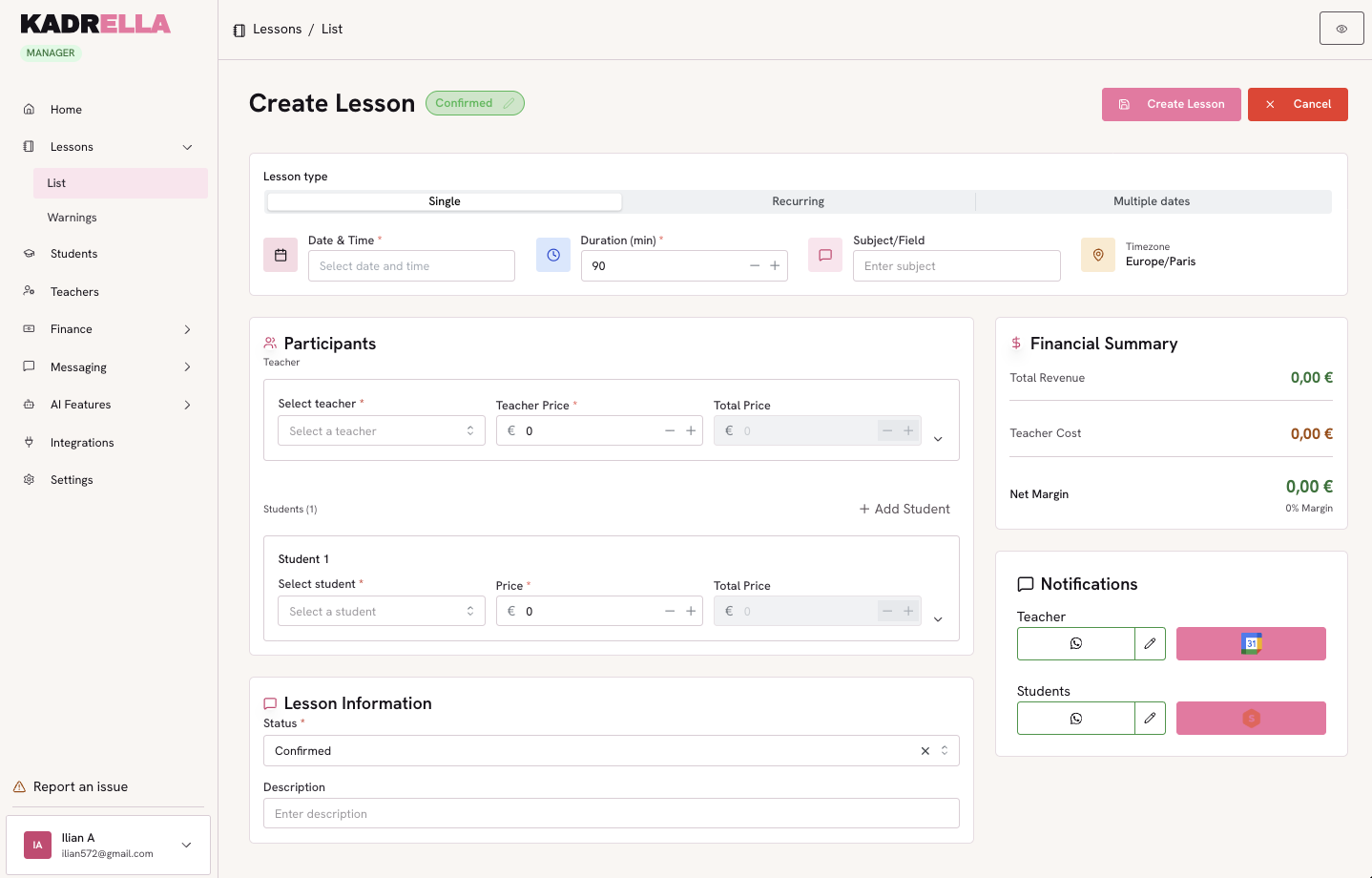
hover or tap a square to see the detail
Calendar Sync
The event shows up in Google Calendar with a reminder, ready for the teacher to check. It also: it's that teacher's own calendar, not a shared spreadsheet-style planning hacked together for the whole team.
Client Management
Lesson history, payments and contact details on a single record per student. It also: the student (or their parent) can log in on their own to check invoices, without messaging the manager for that.
Multi-teacher Management
Each teacher has their own schedule; the manager assigns the right one in a click. It also: a Google Calendar is created automatically for every teacher the moment they join, and what's owed to them is tracked separately from student payments.
Discord
The lesson happens, Kadrella knows without being told
Léa and the teacher hop on a Discord call. Kadrella detects the call, compares its length to the planned lesson, and marks it as attended on its own.
Call ended · 58 min
Discord
Kadrella watches the lesson's Discord call, with nothing for anyone to start manually. It also: if enabled, the AI can summarize the lesson from the messages exchanged in the channel, filling in the lesson record automatically.
Attendance Tracking
Call length is compared to the planned duration: confirmed, shorter than expected, or longer than expected. It also: if the call isn't found right away, Kadrella automatically checks again a few times before deciding.
Invoicing
The invoice goes out on its own, no need to think about it
The lesson happened Thursday. On Friday, Kadrella generates the invoice from the schedule and sends it to Léa automatically.
Billing & Invoicing
PDF invoice generated from the lessons given, numbered, ready to send. It also: goes out automatically by email or WhatsApp, and is never regenerated twice for the same lesson.
Late payment
Five days later, nothing slipped through
The invoice is still unpaid. Kadrella spots the delay on its own and prepares the follow-up.
Payments pending
Léa M.
Invoice #0142 · €30
Payment Processing
Unpaid invoices surface on their own, no digging through a spreadsheet. It also: transfers are matched automatically by IBAN, PayPal or Superprof account, with a manual match available for a payer Kadrella hasn't seen before.
Alerts / Notifications
A late payment is spotted automatically; sending the follow-up is one click away on WhatsApp or the extension. It also: Kadrella generates the recap image on its own, nothing to type by hand.
WhatsApp Web
She replies before even opening the invoice
Kadrella generates an image summary and sends it on WhatsApp automatically. Léa replies two minutes later.
Late payment
Léa M.
Invoice #0142 · €30
Image sent automatically
Kadrella extension
The follow-up goes out on the channel the student actually reads, not an ignored inbox. It also: the same follow-up can be sent in one click from the WhatsApp extension or triggered directly by the manager.
Email / WhatsApp Reminders
The late-payment summary goes out as an image on WhatsApp, with nothing for the manager to type. It also: the original invoice already went out automatically by email, well before the reminder was ever needed.
Bank account
The transfer lands, the invoice closes itself
Kadrella looks at your account in read-only mode and matches every transfer received to the right invoice, never touching your funds.
Léa M.
Transfer received · today 3:02pm
Rayan K.
Transfer received · yesterday
Sami T.
Transfer received · Monday
Bank Reconciliation
The transfer received is matched to the right invoice, read-only on your account. It also: Superprof payouts landing in the account are recognized the same way, no re-entry needed on the student side.
Lesson wrap-up
Nothing left to check by hand, it's already ticked off
Three things matter for a lesson: that it happened, that the student paid, that the teacher got paid. Kadrella tracks all three, no spreadsheet, no follow-up to chase yourself.
Lesson status
End-to-end tracking
All three states, lesson done, student paid, teacher settled, show on the same lesson record. It also: the same data feeds the manager's stats, nothing gets re-entered anywhere else.
Spend your Sundays teaching, not chasing payments.
Free to start, set up in minutes. No card.